


Card Printers: A Complete Guide for Business ID and Badge Printing
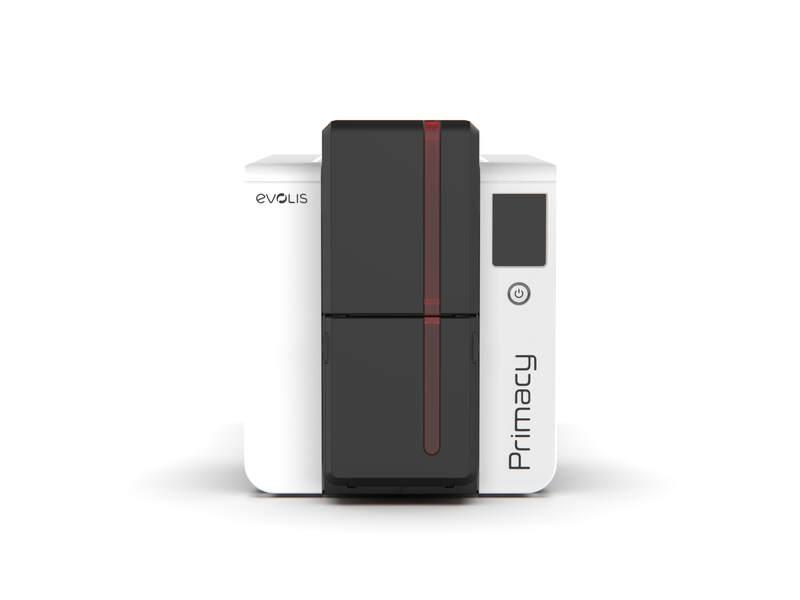
Professional identification matters for businesses, schools, events, and organisations of every size. Whether you issue staff ID cards, visitor badges, membership cards, access cards, or student IDs, having the right printing setup makes the process faster, more secure, and more cost-effective.
Modern card printers allow organisations to print high-quality cards on demand. Instead of outsourcing every badge order, you can produce cards when they're needed, update details immediately, and maintain control over the entire identification process.
If you're comparing printer for plastic cards options or evaluating badge printers for your business, this guide explains what to consider before choosing the right solution.
What Are Card Printers?
Card printers are specialised devices designed to print directly onto plastic cards, typically PVC or composite material in the standard CR80 size (85.6 x 54mm — the same as a credit card). Unlike standard office printers, they're built to handle rigid card material and produce professional output at high resolution, usually 300 DPI.
These printers can produce text, photos, logos, barcodes, and QR codes, and many models support encoding for magnetic stripe cards, smart cards, or contactless RFID cards depending on configuration.
For organisations that regularly issue ID cards or badges, a card printer turns a slow outsourced process into an on-demand operation.
Why Businesses Use Card Printers
Card printers offer flexibility, speed, and control that outsourcing can't match. Common applications include staff identification and access badges, visitor management, student IDs and library cards, contractor badges, membership and loyalty cards, event passes, healthcare staff identification, and security badges with encoded access.
For organisations that onboard staff regularly, manage visitors daily, or run membership programs, in-house printing typically pays for itself within the first year.
Benefits of In-House Badge Printing
1. Immediate Card Production
Print IDs and badges the moment they're needed — no waiting on external suppliers, no minimum orders, no shipping delays.
2. Better Control of Sensitive Information
Employee photos, contractor details, and member information stay within your organisation rather than being shared with multiple external print providers.
3. Consistent Professional Branding
A capable card printer produces cards with company logos, colours, and clear staff photos. The result is a consistent brand identity across every badge issued.
4. Lower Long-Term Cost
For organisations printing more than 200-300 cards per year, in-house printing typically costs significantly less per card than outsourcing once you factor in setup fees, minimums, and shipping.
5. Flexible Card Updates
When staff roles, departments, or access levels change, new cards can be issued in minutes rather than weeks.
Types of Card Printers
Direct-to-Card (DTC) Printers
DTC printers print directly onto the card surface using a thermal ribbon. They're the standard choice for everyday ID printing — practical, affordable, and suitable for most business applications. Print quality is excellent but may have a small unprinted border at the card edge.
Retransfer Printers
Retransfer printers print the design onto a clear film first, then thermally transfer it onto the card. This delivers true edge-to-edge printing and superior quality on uneven card surfaces — particularly important for smart cards with embedded chips or contactless cards with internal antennas.
Retransfer is the right choice when print quality is critical or when you're producing high-security cards with embedded technology.
Single-Sided vs Dual-Sided Printers
Single-sided printers handle basic ID cards, visitor badges, and simple membership cards. Dual-sided models print both sides automatically — useful when you need extra space for emergency contacts, barcodes, terms and conditions, or access instructions on the reverse.
Choosing the Right Printer for Plastic Cards
Before purchasing, work through these questions:
-
How many cards will you print monthly? (low: under 50, mid: 50-500, high: 500+)
-
Single-sided or dual-sided required?
-
Do cards include staff photos or just text and logos?
-
Do you need barcode, QR code, or magnetic stripe encoding?
-
Are access control or smart card features required?
-
Will multiple staff use the printer?
-
What's your total budget — including printer, ribbons, cards, and maintenance?
A clear answer to each question narrows the printer choice considerably.
Important Features to Consider
-
Print resolution — 300 DPI is the industry standard for ID cards; some retransfer printers offer higher resolution for premium applications.
-
Print speed — Measured in cards per hour. Entry-level printers manage 100-150 cards/hour; commercial models reach 200+ cards/hour.
-
Ribbon options — Common ribbons include YMCKO (full colour with overlay) and monochrome (text only). Yields typically run 200-300 prints for full colour or 1,000-2,000 for monochrome.
-
Connectivity — USB is universal; Ethernet allows network sharing; some models offer Wi-Fi.
-
Encoding capabilities — If you need access control or contactless cards, verify the printer supports magnetic stripe (HiCo or LoCo), smart card chips, or RFID encoding as required.
-
Card-handling specs — Most printers handle standard 0.76mm (30mil) PVC cards.
-
Software compatibility — Check the printer works with your card design software and operating system.
Badge Printers for Workplace Security
Badge printers play a real role in workplace security. Staff badges identify authorised personnel; visitor badges manage temporary access; encoded cards control entry to restricted areas.
A professional badge system supports secure entry control, staff identification, visitor tracking, contractor management, emergency response procedures, and restricted area access. For organisations with controlled environments, badge printing complements access control systems, CCTV, and visitor management software.
Industries That Use Card Printers
-
Corporate offices — Staff IDs, visitor badges, access cards
-
Schools and universities — Student IDs, library cards, staff and event passes
-
Healthcare — Staff badges, contractor IDs, patient identification
-
Retail and hospitality — Staff badges, loyalty programs, membership cards
-
Gyms and clubs — Membership and access cards
-
Events and conferences — Attendee passes, exhibitor IDs, VIP credentials
-
Government and security sites — Encoded credentials, high-security IDs
Each industry has different demands on print quality, encoding requirements, and volume.
Common Mistakes to Avoid
-
Choosing a printer based only on initial cost (ribbon and card costs add up fast)
-
Underestimating annual card volume
-
Buying single-sided when dual-sided is actually needed
-
Ignoring encoding requirements until after purchase
-
Using low-quality blank cards (causes print defects and printer wear)
-
Forgetting to budget for cleaning supplies and maintenance
-
Buying for current needs without considering 2-3 year growth
A small amount of planning prevents an expensive replacement later.
How to Maintain a Card Printer
Regular maintenance keeps print quality high and extends printer life:
-
Use manufacturer-approved cleaning kits at recommended intervals
-
Store blank cards in their original packaging, away from dust and humidity
-
Replace ribbons before they fully empty to avoid contamination
-
Keep the printer covered when not in use
-
Avoid touching the printable card surface (oils transfer to ribbons)
-
Follow the manufacturer's cleaning schedule
-
Update printer firmware and drivers when released
Good maintenance reduces print errors and protects your investment.
Why Choose InteractCard
InteractCard provides card printing solutions for businesses and organisations across Australia. Whether you need entry-level ID card printers, commercial-grade badge printers, or a high-resolution printer for plastic cards with encoding capability, InteractCard can help you select the right equipment.
For organisations issuing business ID cards, access cards, visitor badges, or membership cards, InteractCard supports your card printing requirements with practical advice and quality solutions.
Frequently Asked Questions
What's the difference between direct-to-card and retransfer printers?
Direct-to-card printers print directly onto the card surface — the most common choice for everyday ID printing. Retransfer printers print onto a film first and then transfer the image to the card, producing true edge-to-edge prints and better quality on uneven card surfaces like smart cards.
How much does a card printer cost?
Entry-level single-sided printers start around $1,500-$2,500. Mid-range dual-sided models typically cost $3,000-$6,000. Retransfer and high-security printers can range from $5,000 to $15,000+ depending on features.
How many cards can one ribbon print?
A standard full-colour (YMCKO) ribbon typically prints 200-300 cards. Monochrome ribbons can print 1,000-2,000 cards. Check the specific ribbon yield for the model you're buying.
Can I print on smart cards or RFID cards?
Yes, with the right printer. Smart cards (with embedded chips) are best printed with retransfer printers due to surface irregularities. RFID and contactless cards require encoding capability — check the printer specifications.
Do card printers work with standard PVC cards?
Yes. Most card printers are designed for standard 0.76mm (30mil) PVC cards. Always use compatible cards to ensure print quality and avoid printer damage.
How long does a card printer last?
A well-maintained card printer typically lasts 5-8 years. Higher-volume commercial printers may last longer, while heavily used entry-level models may need replacement sooner.
Final Thoughts
Card printers are a practical investment for businesses that regularly issue IDs, badges, or membership cards. They speed up production, improve branding, protect sensitive data, and reduce long-term costs.
The right printer depends on your card volume, design requirements, encoding needs, and budget. With the right equipment and ongoing maintenance, an in-house card printing system can support your organisation reliably for years.
 Spanish
 English
 Arabic
 French
 Portuguese
 Deutsch
 Turkish
 Dutch
Dutch
 Italiano
 Russian
 Romaian
 Portuguese (Brazil)
 Greek
Greek
