


Samsung Galaxy Book5 Pro: Full Review & Guide
Introduction
Choosing a premium Windows laptop in 2026 means wading through a sea of "AI PC" marketing claims, confusing chip names, and near-identical spec sheets. The Samsung Galaxy Book5 Pro cuts through a lot of that noise by focusing on three things most people actually care about: a gorgeous display, all-day battery life, and a chassis light enough to carry without thinking twice.
In this guide, you'll learn exactly what's inside the Galaxy Book5 Pro, how it performs in real-world use (including as a casual gaming laptop), where it falls short, and how it compares to a popular alternative, the Lenovo Yoga Pro 9i. Whether you're a student, a hybrid worker, or someone hunting for a Windows machine that finally feels like a proper MacBook rival, this article will help you decide if the Galaxy Book5 Pro deserves a spot on your desk.
What Is the Samsung Galaxy Book5 Pro?
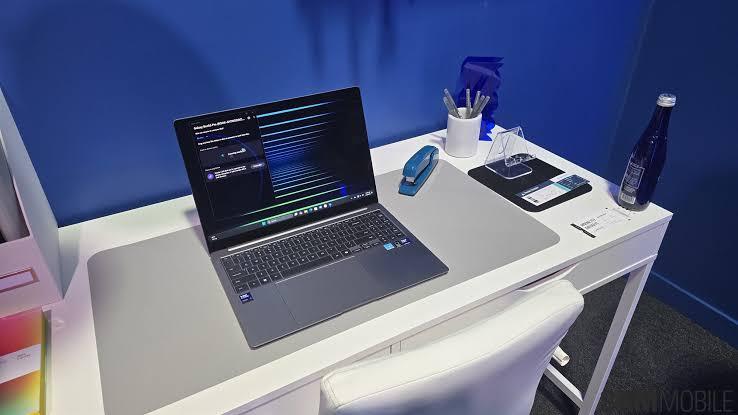
The Galaxy Book5 Pro is a 16-inch Windows ultrabook built around Intel's power-efficient Core Ultra Series 2 ("Lunar Lake") processors. Unlike its sibling, the Galaxy Book5 Pro 360, this model skips the 360-degree hinge and S Pen support in favor of a more traditional clamshell design. The trade-off is a laptop that's a little lighter, a little cheaper, and arguably a little more focused on productivity than versatility.
Key Specifications
-
Display: 16-inch Dynamic AMOLED 2X, 2,880 x 1,800 resolution, touch-enabled
-
Processor: Intel Core Ultra 7 256V (Lunar Lake)
-
Graphics: Intel Arc 140V integrated GPU
-
RAM: 16GB or 32GB configurations
-
Storage: 512GB or 1TB SSD
-
Battery: 63Wh cell
-
Weight: Approximately 1.6 kg (3.44 lbs)
-
Ports: 2x Thunderbolt 4, 1x USB-A 3.2, 1x HDMI 2.1, microSD reader, headphone jack
Pricing
Samsung offers a few configurations to fit different budgets. The base 16GB RAM / 512GB SSD model starts around $1,449, while the 16GB RAM / 1TB SSD version runs about $1,649. Buyers who want more headroom for multitasking can step up to the 32GB RAM / 1TB SSD configuration at roughly $1,749.
Design and Build Quality
Samsung has clearly borrowed a page from the MacBook playbook here in a good way. The Galaxy Book5 Pro's aluminum chassis is minimal, understated, and refreshingly free of gamer-style branding or aggressive angles. It's a slab of gray metal with black keys and a black bezel, and it manages to keep a 16-inch footprint at a very manageable weight.
That said, it's not without quirks. Several reviewers have flagged the keyboard's shallow key travel as a minor annoyance, particularly for people who type for long stretches. It's a small compromise in an otherwise well-built machine, but worth testing in person if tactile feedback matters to you.
Display: The Standout Feature
If there's one component that consistently wins praise, it's the screen. The 16-inch AMOLED panel delivers sharp, vibrant, and color-accurate visuals that make both work documents and streaming video look excellent. Some independent testing has noted slightly higher color deviation in red and blue tones, but for the vast majority of everyday use writing, browsing, spreadsheets, and video playback the display is a genuine highlight of the machine.

Performance: Efficient, Not a Powerhouse
The Intel Core Ultra 7 256V is an efficiency-first chip rather than a raw-power one. In practice, this means the Galaxy Book5 Pro feels snappy for everyday computing opening apps, browsing with dozens of tabs, and light photo editing all feel smooth. Where it shows its limits is in sustained, multithreaded workloads like heavy video rendering or large-scale data processing, where its eight-core design simply isn't built to compete with H-series performance chips.
For content creators dabbling in occasional 4K video editing, the laptop holds up reasonably well, though export times can run longer than on machines built specifically for creative workloads.
Can It Handle Gaming?
The Galaxy Book5 Pro is not marketed as a gaming laptop, and it shouldn't be judged as one. But thanks to the integrated Intel Arc 140V GPU, it's more capable than you'd expect from a thin-and-light ultrabook. Older titles and less demanding games run at comfortable framerates, while newer, graphically intensive titles are playable if you're willing to dial back settings. If gaming is a top priority, a laptop with a discrete GPU will serve you far better but for casual gaming between work sessions, the Book5 Pro won't leave you disappointed.
Battery Life: The Real Selling Point
This is where the Galaxy Book5 Pro truly separates itself from the pack. In standardized battery benchmarks, the laptop lasted over 23 hours before needing a recharge an extraordinary result driven largely by the efficiency of the Lunar Lake architecture. For anyone who regularly works away from a charger students in back-to-back classes, consultants on the road, or remote workers who just don't want to carry a brick everywhere this kind of endurance is genuinely transformative.
Samsung Galaxy Book5 Pro vs. Lenovo Yoga Pro 9i
The Lenovo Yoga Pro 9i is one of the Galaxy Book5 Pro's closest competitors, but the two take very different approaches.
|
Feature |
Samsung Galaxy Book5 Pro |
Lenovo Yoga Pro 9i |
|
Processor |
Intel Core Ultra 7 256V (Lunar Lake) |
Intel Core Ultra 7/9 (H-series) |
|
Graphics |
Integrated Intel Arc 140V |
Discrete Nvidia RTX 5050/5060/5070 |
|
Display |
16" AMOLED, 2880x1800 |
16" OLED/Tandem OLED, up to 3200x2000 |
|
Battery Life |
~23 hours |
Shorter, due to discrete GPU draw |
|
Best For |
Portability, battery life, productivity |
Creative work, light gaming, GPU tasks |
|
Starting Price |
~$1,449 |
~$1,870 |
The bottom line: if all-day battery life and portability are your priority, the Galaxy Book5 Pro wins easily. If you need discrete graphics horsepower for creative software or want stronger gaming performance, the Yoga Pro 9i's Nvidia RTX graphics give it a clear edge at the cost of battery life and a higher starting price.
Real-World Use Cases
-
Students: The long battery life means skipping the charger cable for an entire day of classes, and the light weight makes it easy to carry between buildings.
-
Hybrid and remote workers: A comfortable display and solid keyboard (minor gripes aside) make it a strong daily driver for meetings, documents, and browser-based work.
-
Casual creators: Photo editing and light video work are manageable, though professionals with heavy 4K workflows may want more raw power.
-
Casual gamers: Older or less demanding titles run well; this isn't a replacement for a dedicated gaming laptop, but it covers casual play nicely.
Pros and Cons
Pros
-
Outstanding, vibrant AMOLED display
-
Exceptional battery life (~23 hours in testing)
-
Lightweight, premium aluminum build
-
Strong port selection, including Thunderbolt 4
-
Capable integrated graphics for casual gaming
Cons
-
Shallow keyboard travel may not suit all typists
-
Multithreaded performance lags behind H-series competitors
-
Not built for serious gaming or GPU-intensive creative work
-
Premium price for the specs offered
Frequently Asked Questions
Is the Samsung Galaxy Book5 Pro good for gaming? It can handle casual and older games reasonably well thanks to its integrated Intel Arc graphics, but it isn't designed to compete with dedicated gaming laptops that use discrete GPUs.
How long does the battery actually last? In standardized benchmark testing, the Galaxy Book5 Pro reached roughly 23 hours of use before needing a charge, among the best results in its class.
Is it better than the Lenovo Yoga Pro 9i? It depends on your priorities. The Galaxy Book5 Pro offers better portability and battery life, while the Yoga Pro 9i offers stronger graphics performance thanks to its discrete Nvidia GPU.
What's the difference between the Galaxy Book5 Pro and the Galaxy Book5 Pro 360? The 360 model adds a 360-degree hinge and S Pen support for tablet-style use, while the standard Pro model is a traditional clamshell that's slightly lighter and less expensive.
Is 16GB of RAM enough? For most everyday productivity tasks, yes. Users who multitask heavily or run demanding creative software may prefer the 32GB configuration for extra headroom.
Conclusion
The Samsung Galaxy Book5 Pro isn't trying to be everything to everyone and that's exactly its strength. It delivers a stunning display, genuinely excellent battery life, and a lightweight design that makes it easy to carry all day. It's not a gaming laptop, and it's not the fastest machine for heavy creative workloads. Still, for students, hybrid workers, and anyone who values portability and endurance over raw horsepower, it's one of the most compelling Windows ultrabooks available right now.
If you've used the Galaxy Book5 Pro or are considering it over alternatives like the Lenovo Yoga Pro 9i, share your thoughts in the comments below and if this guide helped you decide, consider sharing it with someone else shopping for their next laptop.

 Arabic
 French
 Spanish
 Portuguese
 Deutsch
 Turkish
 Dutch
Dutch
 Italiano
 Russian
 Romaian
 Portuguese (Brazil)
 Greek
Greek
