


IPTV Setup Guide for Beginners in 2026
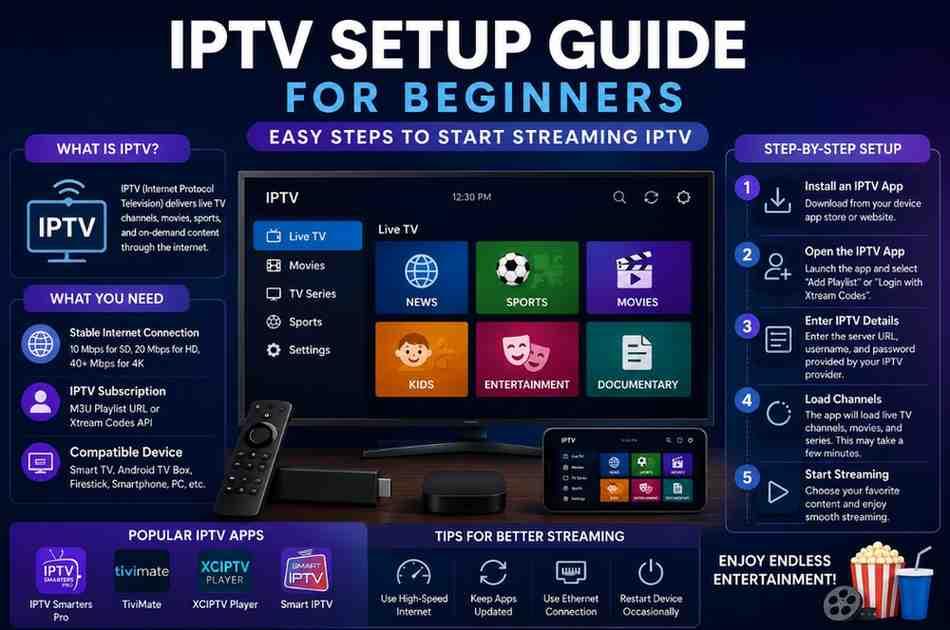
Learn how to set up IPTV easily with this beginner-friendly guide. Discover IPTV apps, installation steps, streaming tips, and FAQs for 2026.
IPTV Setup Guide for Beginners (2026)
What Is IPTV?
IPTV (Internet Protocol Television) is a digital streaming service that delivers live TV channels, movies, sports, and on-demand content through an internet connection instead of traditional cable or satellite systems. Many users prefer IPTV because it offers flexible viewing options, HD streaming, and access across multiple devices.
This beginner-friendly IPTV setup guide explains everything you need to know to start using IPTV safely and easily in 2026.
Why IPTV Is Popular in 2026
IPTV services continue to grow because IPTV provide:
- Access to thousands of live channels
- Sports, movies, and entertainment streaming
- Multi-device support
- Affordable monthly plans
- HD, Full HD, and 4K streaming
- On-demand content libraries
Whether you use a Smart TV, Android device, Firestick, or smartphone, IPTV makes streaming simple and convenient.
What You Need Before Setting Up IPTV
Before starting your IPTV setup, make sure you have:
1. Stable Internet Connection
A fast internet connection is essential for smooth streaming.
Recommended speeds:
- SD Streaming: 10 Mbps
- HD Streaming: 20 Mbps
- 4K Streaming: 40+ Mbps
2. IPTV Subscription
You need an IPTV provider that supplies:
- M3U Playlist URL
- Xtream Codes API
- Username and Password
Always choose a reliable IPTV service with good uptime and support.
3. Compatible Device
You can use IPTV on:
- Smart TVs
- Android TV Boxes
- Amazon Firestick
- Smartphones
- Tablets
- Windows PCs
- Mac devices
Best IPTV Apps for Beginners
Here are some popular IPTV apps that are easy to use:
IPTV Smarters Pro
A beginner-friendly app with a simple interface and multi-screen support.
TiviMate
Popular among Android TV and Firestick users for its modern design and smooth performance.
XCIPTV Player
Known for fast loading speeds and easy navigation.
Smart IPTV
Widely used on Smart TVs for stable streaming.
Step-by-Step IPTV Setup Guide
Step 1: Install an IPTV App
Download an IPTV player from your device’s app store or official website.
Examples:
- Google Play Store
- Amazon App Store
- Smart TV App Store
Step 2: Open the IPTV App
After installation:
- Launch the IPTV app
- Select “Add Playlist” or “Login with Xtream Codes”
Step 3: Enter IPTV Details
Your IPTV provider will usually send:
- Server URL
- Username
- Password
Enter the information carefully.
Step 4: Load Channels
Once logged in, the app will automatically load:
- Live TV channels
- Movies
- TV series
- Sports content
This may take a few minutes during the first setup.
Step 5: Start Streaming
Choose your favorite channel or category and enjoy IPTV streaming.
IPTV Setup on Popular Devices
IPTV Setup on Firestick
- Install Downloader App
- Download IPTV player APK
- Install the app
- Enter IPTV credentials
- Start streaming
IPTV Setup on Smart TV
- Open TV App Store
- Install IPTV player
- Add M3U playlist or Xtream Codes
- Save settings
- Enjoy live channels
IPTV Setup on Android Phone
- Install IPTV app from Google Play
- Login with provider details
- Load playlist
- Watch instantly
Tips for Better IPTV Streaming
Use High-Speed Internet
A stable connection reduces buffering.
Keep Apps Updated
Updated apps improve performance and security.
Use Ethernet Connection
Wired internet is usually faster than Wi-Fi.
Restart Device Occasionally
Restarting clears cache and improves streaming quality.
Common IPTV Problems and Solutions
Buffering Issues
Solution:
- Check internet speed
- Reduce streaming quality
- Restart router
Channels Not Loading
Solution:
- Refresh playlist
- Re-enter login details
- Contact IPTV provider
App Crashing
Solution:
- Clear app cache
- Update app
- Reinstall application
Is IPTV Legal?
IPTV technology itself is legal. However, legality depends on the content provider and licensing rights in your country. Always use authorized and trusted IPTV services.
Advantages of IPTV
- Flexible streaming
- Multi-device access
- Affordable pricing
- Large content library
- HD and 4K support
- Easy installation
Final Thoughts
Setting up IPTV in 2026 is easier than ever. With the right IPTV app, stable internet, and reliable subscription, beginners can enjoy high-quality live TV and entertainment within minutes.
By following this IPTV setup guide, you can quickly install IPTV on your preferred device and start streaming smoothly without technical complications.
FAQs About IPTV Setup
What is the easiest IPTV app for beginners?
IPTV Smarters Pro is considered one of the easiest IPTV apps due to its simple and user-friendly interface.
Can I use IPTV on multiple devices?
Yes, many IPTV providers support multiple devices including Smart TVs, Firestick, Android phones, and PCs.
Why does IPTV buffer frequently?
Buffering usually happens because of slow internet speed, overloaded servers, or unstable Wi-Fi connections.
Do I need a VPN for IPTV?
Some users prefer using a VPN for privacy and improved streaming stability, depending on local regulations and provider requirements.
Can IPTV stream in 4K quality?
Yes, many modern IPTV services support HD, Full HD, and 4K streaming if your device and internet speed are compatible.
How long does IPTV setup take?
Most IPTV setups take only 5–15 minutes depending on the device and app installation process.

 Spanish
 English
 Arabic
 French
 Portuguese
 Deutsch
 Turkish
 Dutch
Dutch
 Italiano
 Russian
 Romaian
 Portuguese (Brazil)
 Greek
Greek
