


Dell XPS 16 9640 Review: Power Meets Polish
Introduction
If you've been shopping for a premium 16-inch laptop, chances are the Dell XPS 16 9640 has already crossed your radar. It's Dell's flagship multimedia machine, built to appeal to creators, professionals, and anyone who wants a Windows laptop that can go toe-to-toe with a MacBook Pro in both looks and horsepower.
But is it actually worth your money, especially when strong alternatives like the Lenovo Yoga Pro 9 exist at similar price points? In this guide, we'll break down everything you need to know: specs, performance, display quality, battery life, pricing, and how the XPS 16 9640 compares to its closest rivals, including Dell's own Alienware 18. By the end, you'll know exactly who this laptop is for and who should look elsewhere.
What Is the Dell XPS 16 9640?
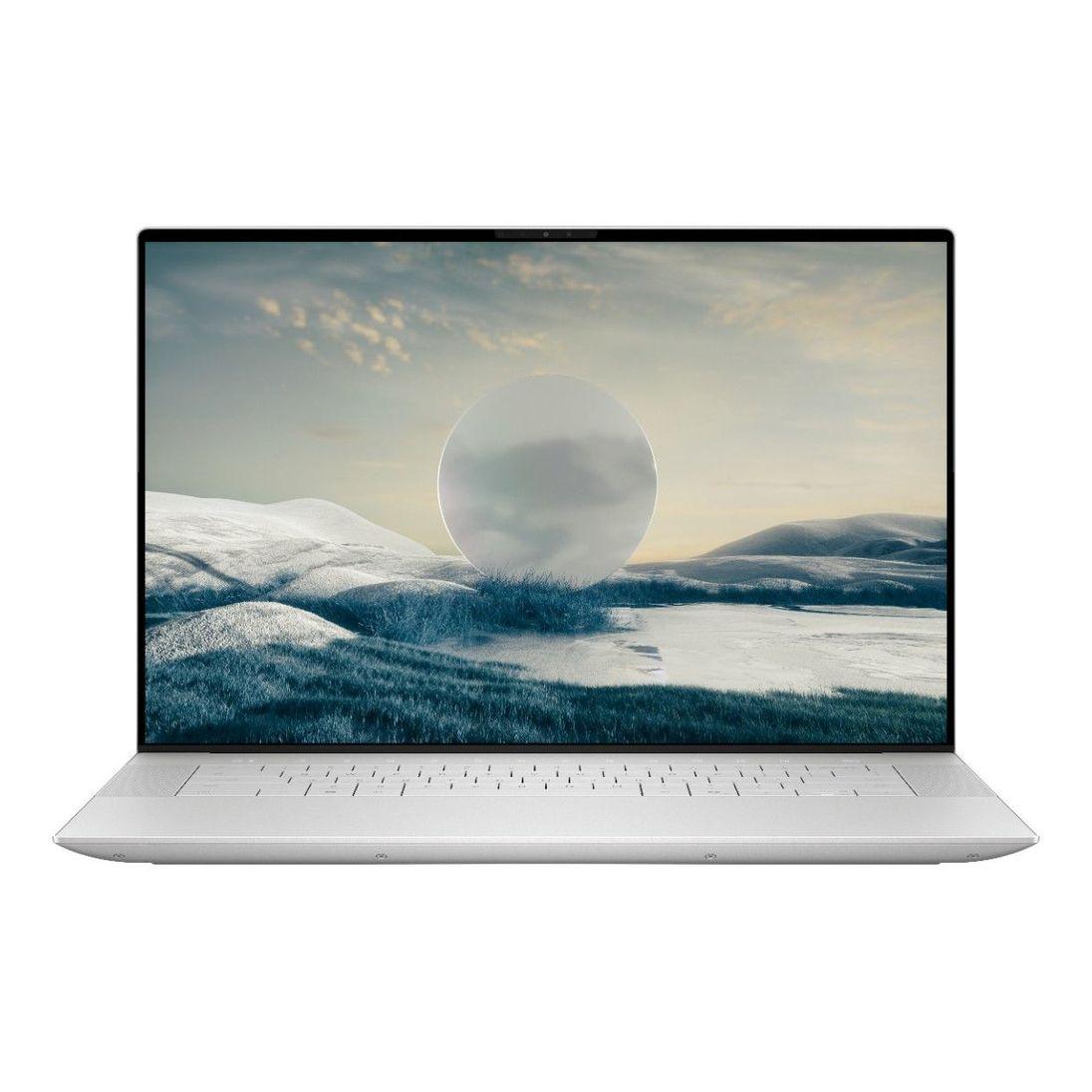
The XPS 16 9640 is Dell's first true 16-inch entry in the XPS lineup, effectively replacing the older XPS 15. It sits alongside the more compact XPS 13 9340 and XPS 14 9440, giving Dell a full range of premium laptops built around the same design language: a minimalist aluminum chassis, edge-to-edge "InfinityEdge" displays, and a glass haptic touchpad.
Unlike the smaller XPS models, the 16-inch version is built with power users in mind. It supports discrete NVIDIA graphics, more RAM headroom, and a larger battery, making it a legitimate option for video editing, 3D rendering, and even light gaming, not just everyday productivity work.
Design and Build Quality
The XPS 16 9640 comes in Platinum or Graphite color options, both finished in CNC-machined aluminum that feels every bit as premium as the price tag suggests. At roughly 0.74 inches thick and about 4.7 pounds, it's not the lightest 16-inch laptop around, but it's competitive with rivals like the Lenovo Yoga Pro 9 and Apple's MacBook Pro 16.
Some standout (and divisive) design choices include:
-
An invisible, edge-to-edge glass touchpad with haptic feedback instead of a traditional clickpad
-
Capacitive touch function keys along the top of the keyboard instead of physical keys
-
A zero-lattice keyboard with large, flat keycaps that stretch nearly edge to edge
These design choices give the laptop a futuristic, clutter-free look, but they're not for everyone. Some reviewers have noted the flat keyboard feels cramped for extended typing sessions, and the touch-based function row takes some adjustment.
Display Options
Dell offers multiple display configurations on the XPS 16 9640, which is one of its biggest selling points:
-
16.3-inch FHD+ (1920×1200), non-touch, up to 120Hz refresh rate, 500 nits brightness, 100% sRGB
-
16.3-inch 4K+ (3840×2400) OLED touch display, 90Hz refresh rate, 400 nits, 100% DCI-P3 color gamut, Dolby Vision support
The 4K OLED panel is the standout option here. It delivers deep blacks, vibrant colors, and excellent contrast ideal for photo and video editors who need color accuracy. The FHD+ option, meanwhile, is better suited to buyers who prioritize battery life and a higher refresh rate over resolution.
Performance: CPU and GPU Options
The Dell XPS 16 9640 launched with Intel's Meteor Lake generation of chips, and buyers can choose between:
-
Intel Core Ultra 7 155H (16 cores, up to 4.8GHz boost)
-
Intel Core Ultra 7 165H (16 cores, up to 5.0GHz boost)
-
Intel Core Ultra 9 185H (16 cores, 24MB cache, up to 5.1GHz boost) the flagship option
On the graphics side, configurations range from integrated Intel Arc graphics all the way up to discrete NVIDIA options:
-
NVIDIA GeForce RTX 4050 (6GB GDDR6, 50W)
-
NVIDIA GeForce RTX 4060 (8GB GDDR6, 50W)
-
NVIDIA GeForce RTX 4070 (8GB GDDR6, 60W)
The RTX 4070 configuration also benefits from a beefier vapor chamber cooling system and faster soldered memory, while lower-tier GPU models use standard cooling and lower-frequency RAM.
In real-world testing, the Core Ultra 7 155H configuration has proven capable of sustaining high power limits over long workloads without significant thermal throttling, thanks to a dual-fan cooling system that occupies nearly half of the laptop's internal volume. That means the XPS 16 9640 can comfortably handle video editing, coding, virtual machines, and even the occasional gaming session, though it isn't marketed as a dedicated gaming laptop.
Memory and Storage
RAM on the XPS 16 9640 is LPDDR5X, soldered directly to the motherboard, so it's important to choose your configuration carefully at checkout since you can't upgrade it later. Options generally range from 16GB up to 64GB, running at speeds up to 6400–7467 MT/s depending on configuration.
Storage comes via a single M.2 PCIe Gen 4 SSD slot, with capacities from 512GB up to 2TB. Independent testing has shown these drives to be fast and resistant to thermal throttling even under sustained workloads.
Battery Life and Charging
The XPS 16 9640 packs a large 99Wh battery about as big as manufacturers can legally fit into a laptop that needs to fly with you. Combined with the efficiency of Intel's Meteor Lake architecture, real-world battery life comfortably clears 12 hours for lighter workloads such as web browsing and document editing, though heavier creative tasks or gaming will drain it much faster.
Charging is handled through a 130W power adapter, delivered via USB-C.

Ports and Connectivity
This is one area where the XPS 16 9640 draws the most criticism. Despite its larger chassis, Dell kept the port selection minimal:
-
Three USB-C ports (with Thunderbolt 4 support varying by configuration)
-
A microSD card reader
-
A 3.5mm headphone jack
Notably absent are USB-A and HDMI ports, though Dell includes a small dongle in the box to cover the gap. Wireless connectivity is handled by Wi-Fi 7, keeping the laptop current with the latest wireless standards.
Audio and Webcam
The quad-speaker setup, tuned with Waves MaxxAudio Pro, delivers surprisingly rich sound for a laptop this thin. The 1080p webcam is fine for video calls but nothing exceptional; colors can run warm, and detail is a bit soft compared to premium competitors.
Dell XPS 16 9640 vs. Lenovo Yoga Pro 9
The Lenovo Yoga Pro 9 (marketed as the Yoga Pro 9i in the U.S.) is arguably the XPS 16 9640's closest competitor, and the two are frequently cross-shopped by creators looking for a 16-inch Windows powerhouse.
|
Feature |
Dell XPS 16 9640 |
Lenovo Yoga Pro 9 (16, Gen 9) |
|
Starting price |
~$1,499 |
~$1,482 |
|
CPU options |
Core Ultra 7 155H/165H, Ultra 9 185H |
Core Ultra 7 155H, Ultra 9 185H |
|
GPU options |
RTX 4050 / 4060 / 4070 |
RTX 4050 / 4060 |
|
Display |
FHD+ 1920×1200 or 4K+ OLED touch |
3.2K IPS or 3.2K Mini-LED, up to 165Hz |
|
Battery |
99Wh |
84Wh |
|
Ports |
3x USB-C/Thunderbolt 4, microSD |
Thunderbolt 4, HDMI, USB-A x2, SD card |
The differences come down to priorities. The XPS 16 9640 has a bigger battery, a more premium (if divisive) minimalist design, and a genuinely stunning OLED display option at the top end. The Yoga Pro 9, on the other hand, offers a faster 165Hz refresh rate, a more traditional and arguably more practical port selection with HDMI and USB-A included, and a Mini-LED display option that some reviewers consider even more impressive for HDR content.
If port flexibility and refresh rate matter most to you, the Yoga Pro 9 has an edge. If you want the sleekest possible design and the longest battery life, the XPS 16 9640 wins out.
Where the Alienware 18 Fits In
It's worth mentioning Dell's other high-performance 16-inch-class sibling: the Alienware line, which shares some DNA with the XPS 16 9640 in terms of internals. Interestingly, some Alienware configurations built around the same Core Ultra 7 155H chip and RTX 4070 graphics have launched at lower prices than comparably specced XPS 16 models, while adding perks like dual Wi-Fi/Ethernet connectivity and swappable SO-DIMM memory.
Of course, the Dell Alienware 18 itself is a different beast entirely, a dedicated gaming laptop with an 18-inch display and gaming-first cooling and design priorities, aimed at buyers who want maximum frame rates over portability or minimalist styling. If raw gaming performance and a larger screen matter more to you than the XPS 16's creator-focused polish, an Alienware machine is worth cross-shopping. But for professionals who want a slim, all-purpose productivity and creative machine, the XPS 16 9640 remains the more practical choice.
Real-World Use Cases
Content Creators: The 4K+ OLED configuration paired with the RTX 4070 makes this a strong choice for photo editing, color grading, and video production, especially given the color-accurate display.
Software Developers: With up to 64GB of RAM and a fast Gen 4 SSD, the XPS 16 9640 comfortably handles virtual machines, Docker containers, and IDE-heavy workflows without slowdown.
Business Professionals: The long battery life and premium build make it a solid road-warrior laptop, though the limited port selection means you'll likely need a dongle or dock for conference room setups.
Casual Gamers: While not a dedicated gaming laptop, the RTX 4060/4070 configurations can handle modern titles at reasonable settings just don't expect gaming-laptop-tier frame rates or cooling.
Pros and Cons
Pros
-
Gorgeous, premium aluminum design
-
Excellent 4K+ OLED display option with strong color accuracy
-
Large 99Wh battery with all-day life on lighter workloads
-
Strong, well-cooled performance from Core Ultra chips
-
Wi-Fi 7 support and solid audio quality
Cons
-
Limited port selection no USB-A or HDMI without a dongle
-
Divisive flat keyboard and capacitive function row
-
Soldered RAM limits future upgradability
-
Pricing climbs quickly with higher-end configurations
-
Webcam quality is only average
Frequently Asked Questions
Is the Dell XPS 16 9640 good for gaming? It can handle modern games reasonably well with the RTX 4060 or RTX 4070 configurations, but it's not designed as a dedicated gaming laptop. For serious gaming, a machine like the Alienware 18 is a better fit.
How much does the Dell XPS 16 9640 cost? Pricing starts around $1,499 for the base configuration and can climb above $4,000 for fully loaded builds with the Core Ultra 9 CPU, RTX 4070 GPU, and 4K+ OLED display.
Can I upgrade the RAM later? No. RAM on the XPS 16 9640 is soldered to the motherboard, so you'll need to choose your configuration carefully at the time of purchase.
Is the Dell XPS 16 9640 better than the Lenovo Yoga Pro 9? It depends on your priorities. The XPS 16 offers a longer battery life and a more minimalist design, while the Yoga Pro 9 offers better port variety and a faster refresh rate display. Neither is a clear-cut winner it comes down to which trade-offs matter more to you.
Does the XPS 16 9640 have Thunderbolt support? Yes, though the exact number of Thunderbolt 4 ports versus standard USB-C 3.2 ports varies depending on your GPU configuration.
Conclusion
The Dell XPS 16 9640 is a genuinely impressive laptop for creators and professionals who want premium build quality, a stunning display, and enough processing power to handle demanding workflows all wrapped in a design that rivals Apple's best. It's not perfect: the port selection is stingy, the keyboard and touchpad take some getting used to, and pricing can climb fast if you go all-in on specs.
Still, when weighed against competitors like the Lenovo Yoga Pro 9 or Dell's own Alienware lineup, the XPS 16 9640 carves out a clear identity as the laptop for people who want power without sacrificing style.
Thinking about picking one up, or have you already got your hands on the XPS 16 9640? Share your experience in the comments below, and if you found this review helpful, pass it along to anyone else shopping for a premium 16-inch laptop.
 Spanish
 English
 Arabic
 French
 Portuguese
 Deutsch
 Turkish
 Dutch
Dutch
 Italiano
 Russian
 Romaian
 Portuguese (Brazil)
 Greek
Greek
