


From Design to Print: Making Custom ID Cards at Your Own Front Desk Today
In many retail, hospitality, food service, and customer-facing businesses, small printed cards do a lot more than display a name or number. They help identify staff, guide customers, present prices, support branding, and keep important information easy to read. For years, many businesses relied on outside suppliers for these cards. That often meant waiting days, ordering in bulk, and paying again whenever a small detail changed.
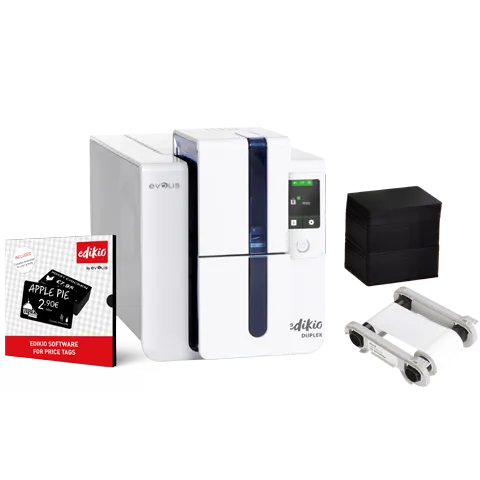
Today, businesses can manage card printing directly from their own front desk, counter, office, or back-of-house area. With modern Edikio card printers, it is now possible to design, personalise, and print professional cards on demand without needing specialist design skills or a large production setup.
Edikio offers all-in-one solutions for creating and printing plastic cards, price tags, buffet labels, staff badges, and display cards. Its solutions include a printer, dedicated software, ribbons, cards, consumables, and accessories, making it easier for businesses to start printing quickly and professionally. Edikio’s official product information highlights solutions for retailers, hotels, restaurants, bakeries, butcher shops, cheese shops, supermarkets, and other customer-facing businesses.
Why Businesses Are Moving Card Printing In-House
Outsourcing card printing can work when designs never change. But most businesses need flexibility. Staff change, product ranges change, prices change, menu items change, and promotions come and go. Waiting for a supplier every time a card needs updating can slow daily operations.
An in-house Edikio Plastic card Printer gives businesses more control. Instead of ordering hundreds of cards at once, teams can print exactly what they need, when they need it.
Common problems with outsourced card printing
|
Challenge |
How in-house card printing helps |
|
Waiting for supplier turnaround |
Print cards immediately at your own location |
|
Minimum order quantities |
Print one card or a small batch as needed |
|
Repeated design change costs |
Update designs in software and reprint |
|
Inconsistent branding |
Use templates, logos, fonts, and standard layouts |
|
Urgent staff or product updates |
Make changes on the same day |
This is especially useful for businesses where customer-facing information must stay current. A café may need new display labels for seasonal products. A hotel may need updated buffet labels. A retailer may need new price tags. A shop may need staff cards or branded customer cards. With an in-house printer, these updates become part of everyday operations rather than a special production task.
What Makes Edikio Card Printers Practical for Front Desk Use?
The best front desk equipment should be compact, easy to operate, and reliable. Edikio solutions are designed for professional users who may not have graphic design or printing experience. The brand’s software is built to help users create labels and cards using templates, product information, images, icons, and Excel imports.
That makes Edikio suitable for business owners, reception staff, managers, retail assistants, hospitality teams, and shop counter teams.
Key features of Edikio card printing solutions
-
Dedicated card and label design software
-
Customisable templates for professional layouts
-
Import options from Excel files
-
MacOS and Windows compatibility
-
Ribbon-based printing for clean, professional output
-
Options for standard and long-format cards
-
Consumables such as PVC cards and print ribbons
-
Accessories including display holders and label holders
-
Support resources, guides, drivers, and assistance materials
Edikio also provides support resources such as installation guidance, user guides, software drivers, videos, and technical assistance, which helps businesses set up and use their products more confidently.
Designing Custom ID Cards Without a Designer
One of the biggest advantages of using an Edikio printer for plastic cards is that businesses do not need to rely on a professional designer for every small update. The software includes ready-to-use templates that can be adapted to suit the business.
For example, a retail store could create a staff ID card with a name, role, logo, and department. A hotel could create guest service cards, event access cards, or buffet presentation cards. A food business could create branded counter display cards with product details and allergen information.
What can be included on a custom ID card?
Depending on your business, a card may include:
-
Staff name and position
-
Business logo
-
Department or access level
-
Product name or category
-
Price or promotional message
-
Allergen or ingredient details
-
QR code or internal reference
-
Brand colours and custom fonts
-
Front and back information for selected models
The goal is not only to print a card, but to create a consistent customer experience. When every card follows the same layout, font, and brand style, your business looks more organised and trustworthy.
From Design to Print: How the Process Works
A modern Edikio setup is designed to make the workflow simple. Once your printer and software are installed, the process usually follows a clear pattern.
Step 1: Choose the right template
Start with a template that matches your use case. This may be a staff badge, price tag, product label, buffet label, display card, or customer-facing information card.
Step 2: Add your business branding
Upload your logo, choose fonts, insert icons, and apply your preferred design style. Edikio software includes customisable templates and professional resources suited to retail and hospitality environments.
Step 3: Enter or import card information
For single cards, you can manually enter details. For larger batches, Excel import can save time, especially when printing product labels, staff cards, or display cards across multiple categories.
Step 4: Preview the final card
Before printing, review the layout, spacing, spelling, logo placement, and information accuracy.
Step 5: Print on plastic cards
Once approved, send the design to your Edikio printer. Some Edikio solutions are designed to print cards quickly, with selected models highlighting approximately 15-second printing for a tag or label.
Product and Service Ranges from Edikio
Edikio provides a practical range of printing solutions for different business needs. This helps companies choose a setup based on their card volume, layout needs, and display requirements.
|
Edikio Range |
Best suited for |
Typical uses |
|
Edikio Price Tag Access |
Small retailers wanting an affordable entry solution |
Basic price tags and display labels |
|
Edikio Price Tag Flex |
Retailers needing standard and long-format tags |
Product labels, larger price cards, food counter displays |
|
Edikio Price Tag Duplex |
Businesses needing double-sided cards |
Detailed product cards, front/back information |
|
Edikio Guest Access |
Hospitality businesses starting with presentation labels |
Buffet labels, catering labels |
|
Edikio Guest Flex |
Hotels, caterers, and venues needing flexible formats |
Buffet labels, allergen cards, event cards |
Edikio Price Tag solutions are aimed at retailers such as bakeries, butchers, cheese shops, florists, grocery stores, supermarkets, seafood markets, and wine retailers. Edikio Guest solutions are designed for hospitality businesses such as hotels, catering companies, restaurants, buffets, and event venues.
Benefits of Printing Plastic Cards at Your Own Front Desk
Using an Edikio Plastic card Printer can support both operational efficiency and customer presentation. Instead of treating card printing as an occasional outsourced project, businesses can make it part of daily workflow.
1. Faster updates
When a team member joins, a product price changes, or a menu item is updated, you can print a new card immediately. This is useful for fast-moving retail and hospitality environments.
2. Better brand consistency
Using templates helps maintain the same visual style across all printed cards. Your counter, buffet, reception desk, and product shelves look more professional.
3. Reduced dependency on suppliers
External suppliers are useful for some large print projects, but daily card updates should not always require outside help. With Edikio card printers, your team gains independence.
4. Cleaner presentation
Plastic cards are durable, professional-looking, and suitable for repeated use in many retail and hospitality settings. Edikio highlights durable, easy-to-clean card surfaces as an advantage for price tag and label solutions.
5. More flexible printing
Print one card, ten cards, or a full set. Businesses can respond to seasonal campaigns, new staff, updated pricing, product launches, or menu changes quickly.
Why Choose Edikio for Business Card Printing?
Edikio stands out because its solutions are not generic office printers. They are built specifically for professional card, label, price tag, and presentation card printing. The company offers dedicated software, compatible consumables, display accessories, and support resources.
The all-in-one approach is especially helpful for businesses that want a ready-to-use solution rather than sourcing printers, cards, ribbons, and software separately. Edikio product packs can include the printer, card design software, printing ribbon, and PVC cards so businesses can begin printing without building a system from scratch.
Edikio is a strong fit for:
-
Retail shops that need professional price tags
-
Food counters needing durable display labels
-
Hotels and restaurants needing buffet labels
-
Businesses wanting staff ID cards
-
Shops that regularly change product information
-
Venues needing event, privilege, or service cards
-
Australian businesses searching for practical plastic card printing solutions
For businesses looking to improve in-house printing, Edikio offers a balance of ease of use, professional presentation, and long-term flexibility.
Final Thoughts
Making custom ID cards at your own front desk is no longer complicated. With modern Edikio card printers, businesses can design, edit, and print professional plastic cards without waiting for a supplier. Whether you need staff ID cards, retail price tags, buffet labels, food display cards, or customer-facing information cards, Edikio provides practical all-in-one solutions for everyday business use.
An Edikio printer for plastic cards helps your team stay flexible, professional, and prepared. Instead of letting outdated cards, missing labels, or supplier delays affect your presentation, you can take control of card printing from inside your own business.
For retailers, hospitality venues, food counters, and service-based businesses, Edikio is more than a printer range. It is a practical way to improve daily operations, strengthen brand image, and deliver clearer information to customers exactly when they need it.
 Russian
 English
 Arabic
 French
 Spanish
 Portuguese
 Deutsch
 Turkish
 Dutch
Dutch
 Italiano
 Romaian
 Portuguese (Brazil)
 Greek
Greek
